App Vetting
Ostorlab App Vetting enables organizations to evaluate third-party mobile applications available on Google Play, the Apple App Store, and Huawei AppGallery before approving them for employee installation or enterprise deployment.
Each App Vetting report combines static analysis, dynamic sandbox execution, zero-trust telemetry analysis, and store metadata to provide a unified, objective security and privacy assessment.
Key Benefits
- Shared Public Verdicts: Vetting assessments are shared across organizations. If an application has already been analyzed, results are available immediately without re-running scans.
- Multi-Platform Support: Native support for Android, iOS, and HarmonyOS applications.
- Objective 0-100 Scoring: Standardized scoring across 5 core security, privacy, and operational dimensions.
- Privacy-Preserving: App Vetting reports summarize security posture without exposing internal organizational scan infrastructure or sensitive raw data.
Searching and Requesting an App Vetting Assessment
To view or request an App Vetting assessment:
-
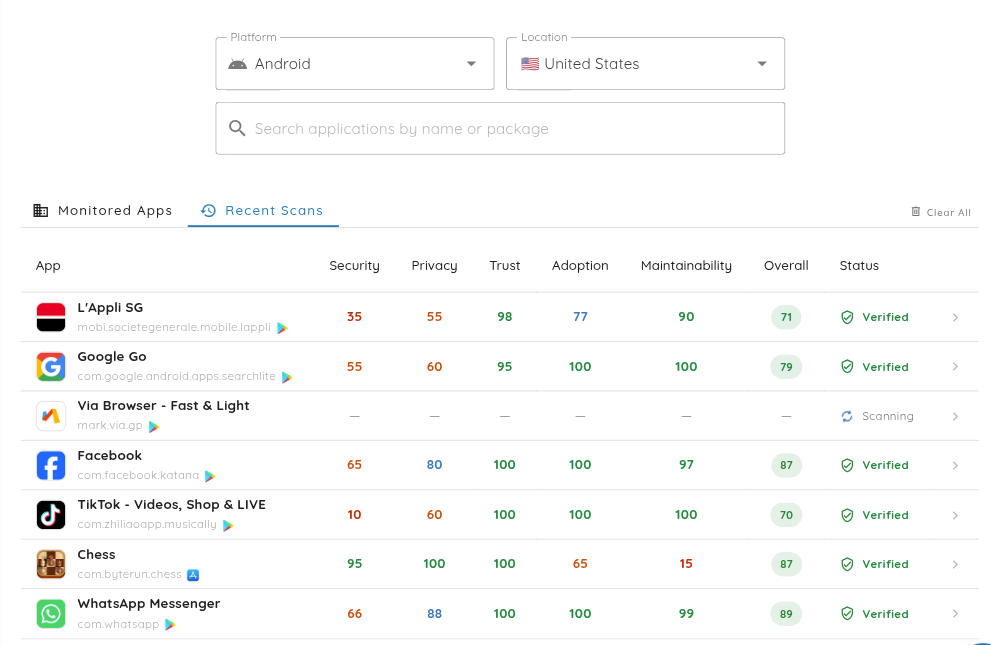
Navigate to Scanning > App Vetting from the left navigation menu.
-
Search for the application by typing its Application Title or Package Name / Bundle ID (e.g.,
com.example.app). -
If the application has not been vetted yet, click Request App Vetting Scan:
- Select the target platform (Android, iOS, or HarmonyOS).
- Enter the official Package Name / Bundle ID.
- Enter the Application Title and click Submit.
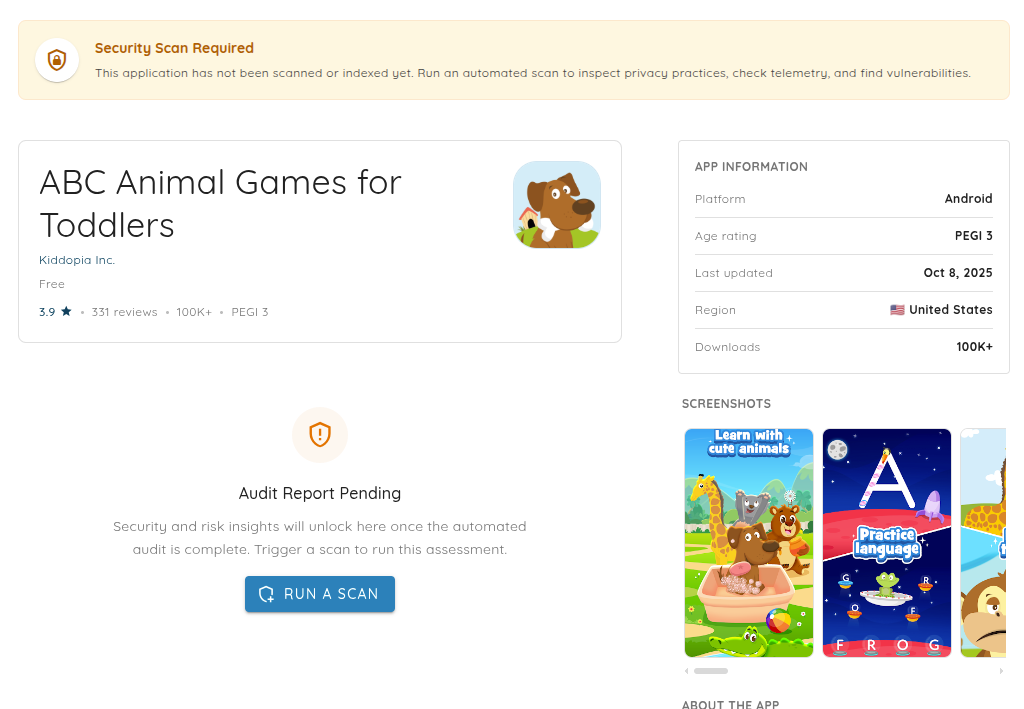
An automated security scan will be dispatched in the background to build the App Vetting report.
Evaluation Criteria & Scoring System
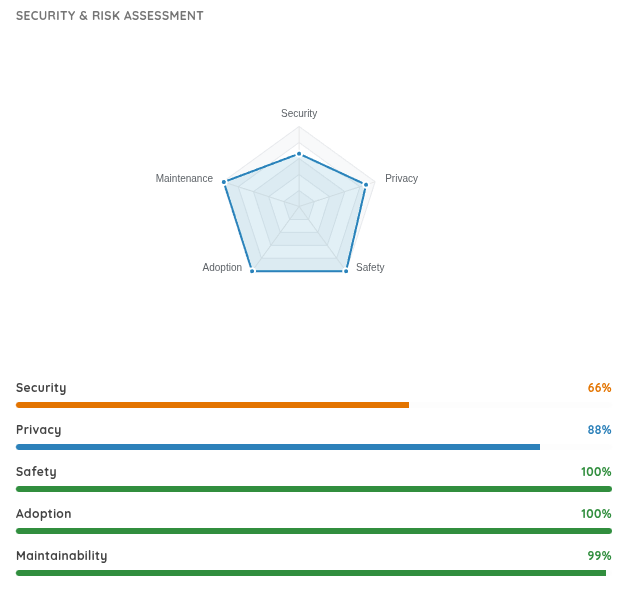
Every App Vetting assessment evaluates the target mobile application across 5 core criteria, producing a score from 0 (Severe Concern) to 100 (Clean / Best) along with a detailed rationale:
| Criterion | Evaluation Scope |
|---|---|
| Safety / Maliciousness | Detects harmful or abusive behaviors, such as malware or spyware indicators, deceptive functionality, trojan patterns, command-and-control behavior, and dangerous capability usage. |
| Security | Evaluates technical vulnerability exposure, including insecure data storage, weak cryptography, cleartext network traffic, exported components, injection flaws, hardcoded secrets, and vulnerable dependencies. |
| Privacy | Analyzes user data handling, including tracking SDKs, excessive device permissions, collection of personal or device identifiers (PII), cleartext transmission, and potential sensitive data leaks. |
| Adoption | Measures store adoption and community trust using download volumes, user ratings, publisher reputation, and package integrity checks. |
| Maintainability | Assesses developer maintenance activity based on update recency, release cadence, dependency age, and framework usage. |
Overall Weighted Score Calculation
The overall App Vetting score is computed as a weighted average across all 5 criteria:
- Safety / Maliciousness: 35%
- Security: 25%
- Privacy: 20%
- Adoption: 10%
- Maintainability: 10%
Score Ranges and Risk Bands
App Vetting uses visual color coding for both top-level report status banners and individual criterion score chips.
Overall Assessment Banners
The top status banner on an App Vetting report categorizes overall risk into 3 primary verdict bands:
| Overall Score | Banner Status | Color | Recommendation |
|---|---|---|---|
| 70 - 100 | Verified Safe to Install | Green | Approved: Low risk. Safe for enterprise deployment. |
| 50 - 69 | Install with Caution | Orange | Moderate Risk: Medium-severity findings detected. Security review advised. |
| 0 - 49 | Not Safe to Install | Red | High Risk: Critical security vulnerabilities or abusive behavior detected. Do not install. |
Criterion & Badge Scoring Ranges
Individual criteria scores and table badges map to 4 score bands:
| Score Range | UI Badge | Rating Level | Scope |
|---|---|---|---|
| 90 - 100 | Green | Excellent | Exceptional security, privacy, and maintenance posture. |
| 70 - 89 | Blue | Good | Solid overall posture with minor low-risk observations. |
| 50 - 69 | Orange | Moderate | Moderate risk areas requiring attention or configuration hardening. |
| 0 - 49 | Red | Poor / Severe | High risk or critical vulnerability findings. |
Safe Containment Sandbox & Zero-Trust Telemetry
App Vetting uses a safe containment execution sandbox to observe application runtime behavior in isolation without exposing internal production systems.
Key Capabilities
- Runtime Monitoring: Real-time analysis of system API calls, sensitive device permissions, and file access.
- Network Inspection: Deep packet inspection of outbound network traffic to detect unencrypted PII, tracking endpoints, and command-and-control (C2) servers.
- Zero-Trust Telemetry Assessment: Audits third-party SDKs, analytics frameworks, and unexpected background data flows against privacy policies.
- Behavioral Malware Analysis: Identifies hidden payloads, dynamic code execution, and anti-analysis evasion techniques.
Assessment Status Lifecycle
An App Vetting assessment progresses through the following status states during its lifecycle:
- Pending: The scan request is queued for processing.
- Scanning: An automated mobile security scan is currently running in the sandbox environment.
- Scored: Analysis is complete and criterion scores are published.
- Failed: The scan or scoring process encountered an error and requires re-triggering.
Reviewing Detailed Audit Findings
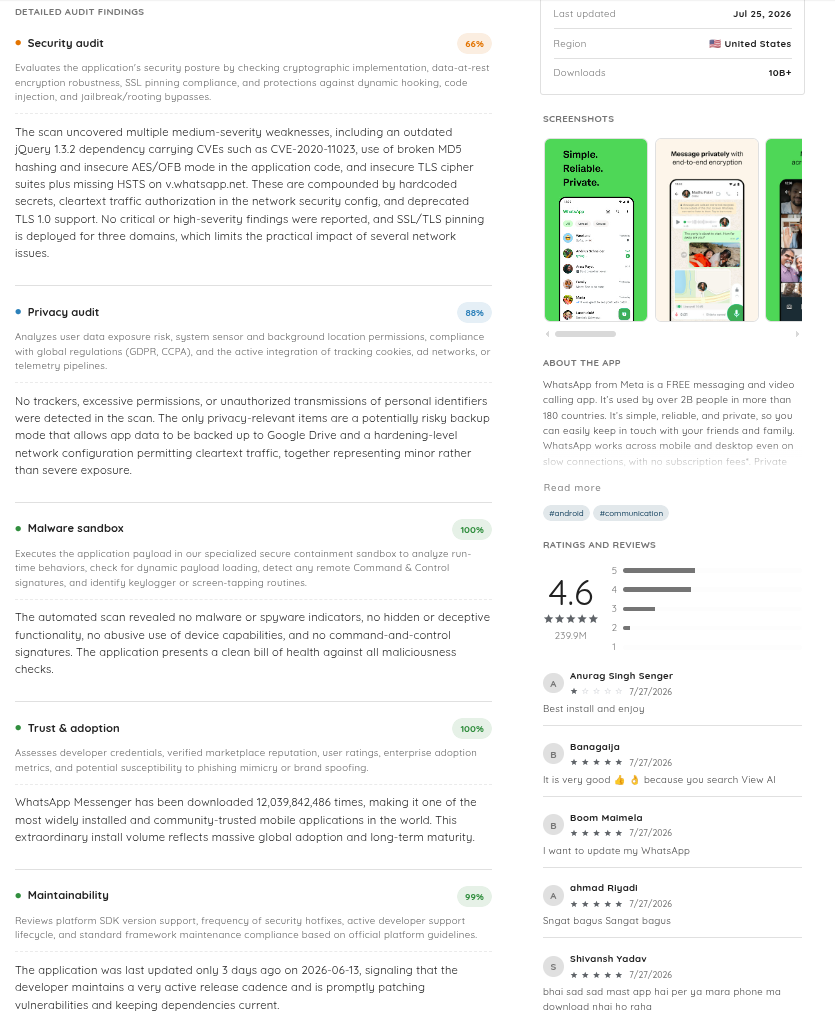
Clicking on any application opens the full App Vetting Report:
- Header & Store Metadata: View store rating, age rating (e.g., PEGI 3 / 4+), country, price, and last updated date.
- Detailed Audit Panels: Expand individual criteria (Security Audit, Privacy Audit, Malware Sandbox, Trust & Adoption, Maintainability) to review specific findings, severity ratings, and AI-generated rationales.
Sharing App Vetting Reports
You can share an App Vetting assessment with external vendors, auditors, or team members:
- Open the target App Vetting report.
- Click Share Report or View Full Scan in the top action bar.
- Copy the generated secure shared link.
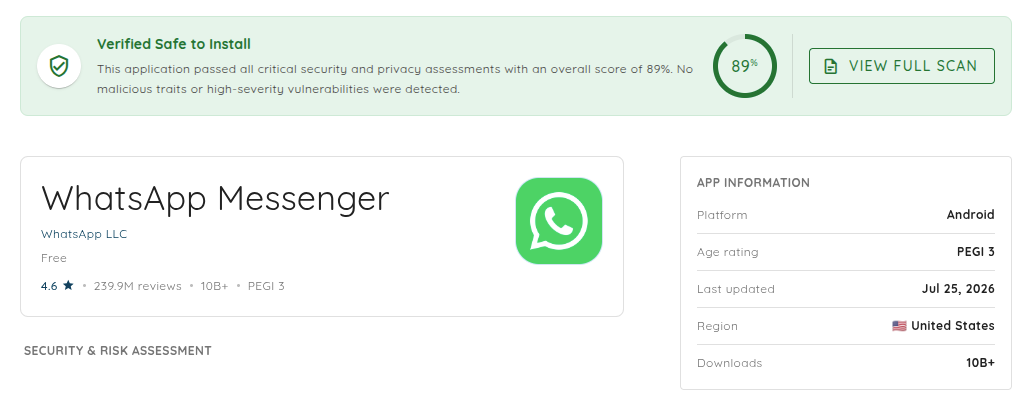
Shared access links allow external reviewers to inspect the security assessment safely without requiring organization membership or exposing sensitive internal infrastructure.
Recommended Best Practices
- Pre-Deployment Vetting: Review third-party apps before authorizing enterprise BYOD or corporate device installation.
- Version Release Re-Evaluation: Re-vet applications whenever a major version update is published on public stores.
- Balanced Risk Analysis: Evaluate both the top-level score and individual category breakdowns (e.g., Privacy vs. Security) to align with internal compliance policies.
- Vendor Risk Management: Use shared App Vetting reports during procurement to request security remediations from software vendors.