资产盘点高级搜索
概述
高级查询语言为用户提供了一种类似于Python的灵活语法,以精准高效地查询和过滤资产。
该语言采用 字段 操作符 值 结构来构建搜索表达式,从而实现高级的资产发现功能。
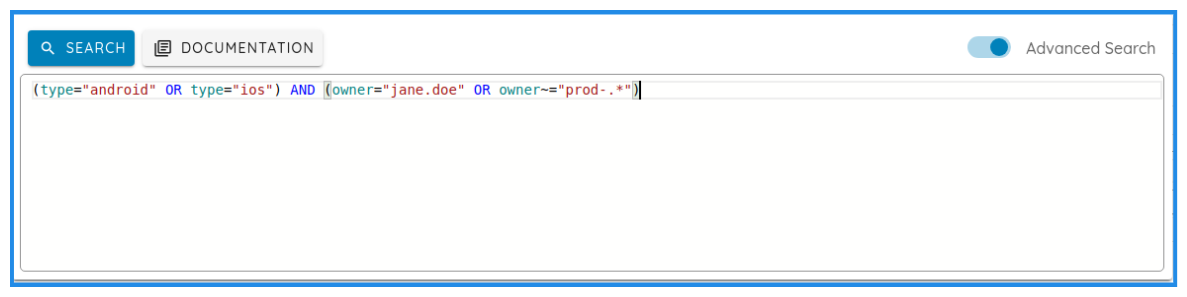
查询示例
- 基础查询:
type="android" - 正则表达式匹配:
asset~=".*@mywebdomain\.com" - AND/OR 查询:
type="android" OR type="ios" - 组合查询:
(type="android" OR type="ios") AND (owner="jhon.doe" OR owner~="prod-.*")
语法
字段-操作符-值结构
每个查询都由以下组件构建:
- 字段 (Field):要过滤的属性(例如
type、owner、service.port)。 - 操作符 (Operator):指定条件(例如
=、!=、<、>)。 - 值 (Value):要匹配的值(例如
android、443)。
支持的操作符
=:等于。!=:不等于。<:小于(用于日期和数值字段)。>:大于(用于日期和数值字段)。~=:正则表达式(Regex)搜索。
支持的字段
以下是支持的字段列表,及其描述和可用值:
| 字段 | 描述 | 支持的操作符 | 可选值 | 示例 |
|---|---|---|---|---|
ownership |
区分内部资产、收购资产和第三方服务资产 | =, != |
internal, third_party_service,acquisition,rejected |
ownership="internal" |
type |
按资产类型过滤 | =, != |
android, ios, subdomain, domain, ip, org, asn, tld, email, address, person, certificate, coordinates |
type="android" |
owner |
按资产所有者名称过滤 | =, !=, ~= |
任意字符串或正则表达式 | owner="john.doe" or owner~="prod-.*" |
asset |
按资产内容搜索,如IP地址、移动应用包名或域名值。 | =, !=, ~= |
任意字符串或正则表达式 | asset="example.com" or asset~=".*@domain\.com" |
service.port |
按服务端口过滤 | =, !=, <, > |
任意端口号 | service.port=443 or service.port>80 |
service.protocol |
按服务协议过滤 | =, !=, ~= |
任意字符串或正则表达式 | service.protocol="https" |
whois.address |
按WHOIS地址过滤 | =, !=, ~= |
任意字符串或正则表达式 | whois.address="123 Main St" |
whois.email |
按WHOIS电子邮件过滤 | =, !=, ~= |
任意字符串或正则表达式 | whois.email="admin@example.com" |
whois.org |
按WHOIS组织名称过滤 | =, !=, ~= |
任意字符串或正则表达式 | whois.org="Example Corp" |
dns.record |
按DNS记录类型过滤 | =, != |
任意字符串或正则表达式 | dns.record="MX" |
dns.value |
按DNS值过滤 | =, !=, ~= |
任意字符串或正则表达式 | dns.value="mail.example.com" |
dns.date |
过滤在特定日期修改过DNS记录的资产 | <, >, = |
有效的日期字符串必须采用 YYYY-MM-DD 格式。 | dns.date="2023-02-04" or dns.date>2023-01-01 |
fingerprint.name |
按指纹名称过滤 | =, !=, ~= |
任意字符串或正则表达式 | fingerprint.name="Apache" |
fingerprint.detail |
按指纹详细信息过滤 | =, !=, ~= |
任意字符串或正则表达式 | fingerprint.detail="2.4.41" |
fingerprint.version |
按指纹版本过滤 | =, !=, ~= |
任意字符串或正则表达式 | fingerprint.version="1.0.0" |
fingerprint.date |
过滤在特定日期修改过指纹的资产 | <, >, = |
有效的日期字符串必须采用 YYYY-MM-DD 格式。 | fingerprint.date="2023-02-04" |
certificate.serial |
按证书序列号过滤 | =, !=, ~= |
任意字符串或正则表达式 | certificate.serial="123456" |
certificate.issuer |
按证书颁发者过滤 | =, !=, ~= |
任意字符串或正则表达式 | certificate.issuer="Let's Encrypt" |
certificate.subject |
按证书主题过滤 | =, !=, ~= |
任意字符串或正则表达式 | certificate.subject="example.com" |
certificate.date |
按证书日期过滤 | <, >, = |
有效的日期字符串必须采用 YYYY-MM-DD 格式。 | certificate.date="2023-02-04" |
tag |
按标签名称过滤 | =, != |
任意字符串或正则表达式 | tag="production" |
value |
按标签值过滤 | =, != |
任意字符串或正则表达式 | value="critical" |
组合查询
逻辑操作符
组合查询利用两个主要的逻辑操作符:
AND:组合两个条件,且两者都必须为真OR:组合两个条件,且至少有一个必须为真
使用括号分组
圆括号 () 用于创建逻辑分组,并控制复杂查询中的运算顺序。
查询组合示例
-
多条件过滤
查找由 John Doe 所有的 Android 资产。type="android" AND owner="john.doe" -
复杂条件分组
查找由 John Doe 所有,或匹配生产环境(production)所有者模式的移动资产(Android 或 iOS)。(type="android" OR type="ios") AND (owner="john.doe" OR owner~="prod-.*") -
嵌套条件过滤
查找具有 HTTP 或 HTTPS 端口的域名资产。type="domain" AND (service.port="443" OR service.port=80)
高级过滤策略
-
排除查询
查找非测试或开发团队所有的域名资产。type="domain" AND owner!="test" AND owner!="dev" -
基于正则表达式的复杂匹配
查找匹配多个正则表达式模式的子域。(asset~=".*internal\.com" OR asset~=".*external\.org") AND type="subdomain" -
基于日期的过滤
查找 2023年1月1日 之后由 Let's Encrypt 颁发的证书。certificate.date>"2023-01-01" AND certificate.issuer="Let\'s Encrypt"